Showing posts with label BOOTSTRAP. Show all posts
Published June 10, 2020 by RIT with 0 comment

CARA MENAMPILKAN GAMBAR KE MODAL DENGAN JQUERY

Assalamualaikum warohmatullohi wabarokatuh,
Wa alaikum salam warohmatullohi wabarokatuh,

cara menampilkan gambar ke modal dengan jquery

Tampilan awal


Tampilan setelah menekan tombol nya

di episode ini langsungkoding.blogspot.com akan berbagi cara menampilkan gambar ke modal dengan jquery, disini langsungkoding.blogspot.com menggunakan bootstrap framework css, dan library jquery. langsung saja kode nya di bawah ini, tinggal copypaste  


1
2
3
4
5
6
7
8
9
10
11
12
13
14
15
16
17
18
19
20
21
22
23
24
25
26
27
28
29
30
31
32
33
34
35
36
37
38
39
40
41
42
43
44
45
46
47
48
49
50
51
52
53
54
55
56
<html>
    <head>
    <title> parse gambar</title>
    <link rel="stylesheet" href="https://maxcdn.bootstrapcdn.com/bootstrap/4.0.0/css/bootstrap.min.css" integrity="sha384-Gn5384xqQ1aoWXA+058RXPxPg6fy4IWvTNh0E263XmFcJlSAwiGgFAW/dAiS6JXm" crossorigin="anonymous">
    <script src="https://code.jquery.com/jquery-3.2.1.slim.min.js" integrity="sha384-KJ3o2DKtIkvYIK3UENzmM7KCkRr/rE9/Qpg6aAZGJwFDMVNA/GpGFF93hXpG5KkN" crossorigin="anonymous"></script>
    <script src="https://cdnjs.cloudflare.com/ajax/libs/popper.js/1.12.9/umd/popper.min.js" integrity="sha384-ApNbgh9B+Y1QKtv3Rn7W3mgPxhU9K/ScQsAP7hUibX39j7fakFPskvXusvfa0b4Q" crossorigin="anonymous"></script>
    <script src="https://maxcdn.bootstrapcdn.com/bootstrap/4.0.0/js/bootstrap.min.js" integrity="sha384-JZR6Spejh4U02d8jOt6vLEHfe/JQGiRRSQQxSfFWpi1MquVdAyjUar5+76PVCmYl" crossorigin="anonymous"></script>
    </head>
 
   <body>
 
      <p>tekan gambar atau tombol untuk menampilkan gambar ke modal</p>
      <a class="btn btn-warning" id="tombol_klik" data-toggle="modal" data-target="#modalGambar" data-gmbr='user-langsungkoding.blogspot.com.png'>klik saya</a>
      <br><br>
      <img src="user-langsungkoding.blogspot.com.png" width="100px">
 
   </body>
 
</html>
 
<!-- modal -->
<div class="modal fade" id="modalGambar" role="dialog">
  <div class="modal-dialog">
 
    <form method="post" action="change-goal">
      <div class="modal-content">
        <div class="modal-header">
          <h4 class="modal-title">Menampilkan gambar ke modal</h4>
          <button type="button" class="close" data-dismiss="modal">&times;</button>
        </div>
        <div class="modal-body">
          <img id="parse-src">
        </div>
        <div class="modal-footer">
          <button type="button" class="btn btn-default" data-dismiss="modal">Tutup</button>
        </div>
      </div>
    </form>
  </div>
</div>
<!-- end modal -->
 
<script>
 $(document).ready(function() {
    $("#tombol_klik").click(function(e) {
       e.preventDefault();
       var gmbr = $(this).attr('data-gmbr');
        
       $('#parse-src').attr('src',gmbr);
       $('#parse-src').attr('width','100px');
 
       $("#modalGambar").modal();
    });
 });
 
</script>

Terima Kasih
Thank's

TAG TAGS :
cara menampilkan gambar ke modal | cara oper nilai img ke modal | how to add atribut src with jquery | how to parse img to modal bootstrap | bootstrap | jquery


BACA JUGA :

Read More
      edit
Published October 31, 2019 by RIT with 0 comment

CARA OPER ID PADA MODAL BOOTSTRAP

Assalamualaikum warohmatullohi wabarokatuh.
Wa alaikum salam warohmatullohi wabarokatuh.

Berikut adalah cara oper id pada modal bootstrap, sebelum melanjutkan membaca, diharapkan telah mengerti tentang
  • koneksi database pada php
  • memahami script js dan jQuery
  • fungsi pada require_once
baik langsung saja, berikut scriptnya.

1
2
3
4
5
6
7
8
9
10
11
12
13
14
15
16
17
18
19
20
21
22
23
24
25
26
27
28
29
30
31
32
33
34
<?php 
require_once'../hefo/header.php'; //pada require_once adalah tempat menampung css js bootstrap dan jquery serta koneksi db
 ?>
 
<!-- Trigger the modal with a button -->
<button type="button" class="btn btn-success openBtn" data-id='36'>Open Modal</button>
 
<!-- Modal -->
<div class="modal fade" id="myModal" role="dialog">
    <div class="modal-dialog">
        <!-- Modal content-->
        <div class="modal-content">
            <div class="modal-header">
                <h4 class="modal-title">Modal with Dynamic Content</h4>
                <button type="button" class="close" data-dismiss="modal">&times;</button>
            </div>
            <div class="modal-body">
 
            </div>
            <div class="modal-footer">
                <button type="button" class="btn btn-default" data-dismiss="modal">Close</button>
            </div>
        </div>
    </div>
</div>
 
<script>
$('.openBtn').on('click',function(){
    var id_tugas = $(this).attr('data-id');
    $('.modal-body').load('modal.php?id='+id_tugas,function(){
        $('#myModal').modal({show:true});
    });
});
</script>

1
2
3
4
5
6
7
8
<?php 
require_once"../core/init.php";
$id_t = $_GET["id"];
$a = mysqli_fetch_array( jel_ed($id_t) );
?>
 
<input type='text' value='<?php echo $a['id_t'];  ?>' readonly>
<input type='text' value='<?php echo $a['knt_t'];  ?>' readonly>


Terima Kasih.
Thank's.

Tag :
CRUD MODAL PHP | MEMBUAT CRUD PHP DENGAN MODAL BOOTSTRAP | CARA MEMBUAT EDIT DENGAN MODAL BOOTSTRAP | CARA OPER DATA ID PADA MODAL BOOTSTRAP | HOW TO REMOTE MODAL IN ANOTHER PAGE | HOW TO REMOTE MODAL BOOTSTRAP ANOTHER PAGE

Baca Juga :
Read More
      edit
Published July 18, 2019 by RIT with 0 comment

CARA MENAMPILKAN GAMBAR DARI DATABASE KE MODAL BOOTSTRAP

Assalamualaikum warohmatullohi wabarokatuh.
Wa alaikum salam warohmatullohi wabarokatuh.

Episode ini akan berbagi script koding MENAMPILKAN GAMBAR DARI DATABASE ke modal Bootstrap sesuai dengan id.
-Disaat user klik tombol lihat/tombol detail
-Muncul Pop Up Modal yang berisi infomrasi tentang user yang ingin dilihat


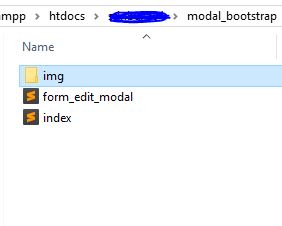
-Buatlah folder didalam htdocs dengan nama modal_bootstrap
-Buatlah 2 file php. index.php dan form_edit_modal.php
-lalu Buatlah folder dengan nama img didalam folder modal_bootstrap
-seperti gambar di bawah ini struktur foldernya

-siapkan gambar atau foto yg bereksitensi PNG atau JPG.
-Dan simpan gambar tersebut kedalam folder img yang telah dibuat tadi
-sehingga seperti gambar di bawah ini.


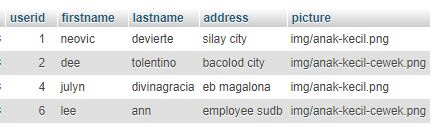
-buatlah database test.selain itu bebas
-buatlah table pada database seperti gambar di bawah ini.


1
2
3
4
5
6
7
8
9
10
11
12
13
14
15
16
17
18
19
20
21
22
23
24
25
26
27
28
29
30
31
32
33
34
35
36
37
38
39
<!DOCTYPE html>
<html>
<head>
    <title></title>
 
</head>
<body>
 
<?php 
    $koneksi = mysqli_connect('localhost','root','','test'); 
    $query   "SELECT * FROM user";
    $query2   = mysqli_query($koneksi$query);
?>
<br>
<br>
<br>
    <table border="1" width="100%">
        <tr>
            <td>id_db</td>
            <td>nama</td>
            <td>operation</td>
        </tr>
    <?php while ($row = mysqli_fetch_array($query2)){ ?>
        <tr>
        <td><?php echo $row['userid']; ?></td>
            <td><?php echo $row['firstname']; ?></td>
            <td>
          <a href="#id<?php echo $row['userid']; ?>" data-toggle="modal" class="btn btn-primary"><span class="glyphicon glyphicon-eye-open"></span> Lihat</a>
      <?php include('form_edit_modal.php'); ?>
        </td>
      </tr>
    <?php } ?>
    </table>
 
</body>
</html>
1
2
3
4
5
6
7
8
9
10
11
12
13
14
15
16
17
18
19
20
21
22
23
24
25
26
27
28
29
30
31
32
33
34
  <!-- Modal -->
  <div class="modal fade" id="id<?php echo $id=$row['userid'];  ?>" role="dialog">
          <?php 
            // $koneksi = mysqli_connect('localhost','root','','test'); 
              $q_modal   "SELECT * FROM user WHERE userid = $id";
              $q_modal2  = mysqli_query($koneksi$q_modal);
              $row2       = mysqli_fetch_array($q_modal2);
               
          ?>
 
    <div class="modal-dialog">
     
      <!-- Modal content-->
      <div class="modal-content">
        <div class="modal-header">
          <button type="button" class="close" data-dismiss="modal">&times;</button>
          <h4 class="modal-title"><?php echo $row2["firstname"]; ?></h4>
        </div>
        <div class="modal-body">
          <img src="<?php echo $row2['picture']; ?>" width='50%' height='50%'><br>
          id  = <?php echo $row2["userid"]; ?><br>
          nama depan = <?php echo $row2["firstname"]; ?><br>
          nama belakang = <?php echo $row2["lastname"]; ?><br>
          alamat = <?php echo $row2["address"]; ?>
        </div>
        <div class="modal-footer">
          <button type="button" class="btn btn-default" data-dismiss="modal">Close</button>
        </div>
      </div>
       
    </div>
  </div>
   
</div>

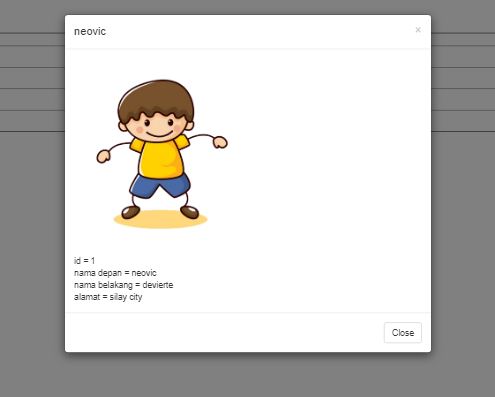
Dan hasilnya akan seperti gambar dibawah ini.


Muncul modal saat klik tombol lihat.


Terima Kasih.
Thank's.

SOURCE : https://www.sourcecodester.com/php/11629/phpmysqli-crud-operation-bootstrapmodal.html

Tag :
cara oper data pada modal bootstrap | oper data pada modal | menampilkan gambar pada modal | how to passing data to modal in bootstrap |

Baca Juga :
  • LINK 1
  • LINK 2

Read More
      edit